

Repair
Plan work on a vehicle you own
Focus on damage findings, replacement parts, labor and paint. Use the result to prepare questions for a repairer.
Car Repair Estimate & Parts by AutoEstimatePro turns damage photos and vehicle details into a preliminary parts, labor, and paint report. Compare repair options, source parts, or plan a salvage-auction bid before you commit.


Free download. Reports and subscriptions are separate paid purchases. Check your store for device compatibility.
Checked November 13, 2026: both apps version 1.0.4; iPhone requires iOS 15.1+, Android requires Android 7.0+. Confirm current compatibility in your store. Visit AutoEstimatePro.app — the official Android and iPhone app website.
Meet the AutoEstimatePro assistants
Available in the AutoEstimatePro app. Preview all six profiles below; your app account type determines your assistant. Use a saved report to prepare questions for a shop. You can browse the directory without using the app.
12 ready questions per profileChat does not use report credits
Profile preview · Body shop conversations
Use report context to prepare clear explanations, intake questions and a useful conversation about repair scope.
An example question to bring
“Turn the findings into a customer-friendly explanation and a separate list of items the shop needs to verify.”
Then ask: Which parts, labor assumptions and unpriced operations should we discuss before comparing totals?
A useful outcome to aim forA clearer handoff between the report, customer and repairer.
Give the question context
Each profile focuses explanations on an account type. Sample questions are editorial examples; confirm repair findings, prices and decisions with the responsible people.
Read the shop conversation guideChoose the report for your decision
Start with the vehicle's 17-character VIN and damage photos. Free NHTSA VIN decoding helps check the vehicle identity, and recent VINs help you return to vehicles you have entered. Match the decoded details with the car before ordering; a decode does not establish its accident or title history.
Repair
Focus on damage findings, replacement parts, labor and paint. Use the result to prepare questions for a repairer.
Insurance
Prepare a preliminary repair-cost breakdown for an insurance conversation. This is not an insurer's approval, coverage decision or final settlement.
Rebuild
Plan a rebuild to keep or resell, with repair scope, vehicle-value context and investment analysis for an auction purchase.
Flip
Compare an acquisition with an as-is resale scenario, using your value and cost assumptions.
Part Out
Review a part-out scenario and the costs that affect a salvage bid. Modeled values are research inputs, not confirmed sale proceeds.
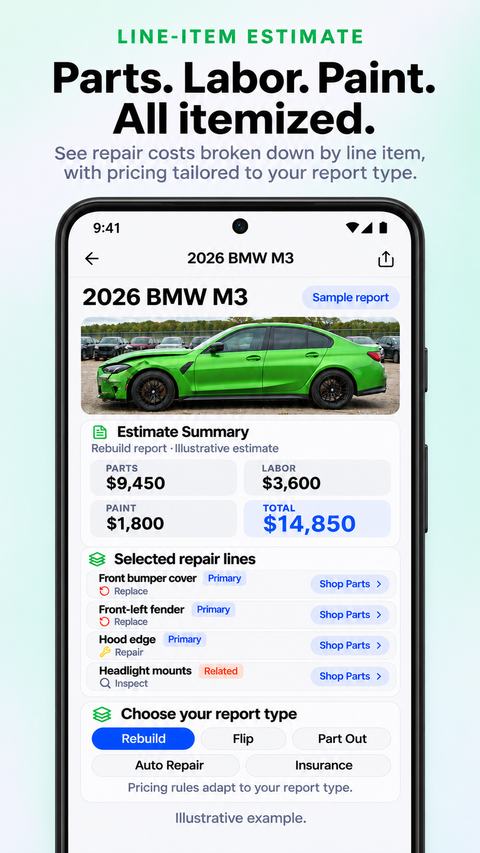
Vehicle-value and Investment Analysis sections belong to the auction-focused Rebuild, Flip and Part Out reports. Repair and Insurance reports hide those auction sections. Report-level parts purchase links are shown for Rebuild, Repair and Insurance when sources are available; they are omitted from Flip and Part Out reports.
A separate tool for the part in front of you
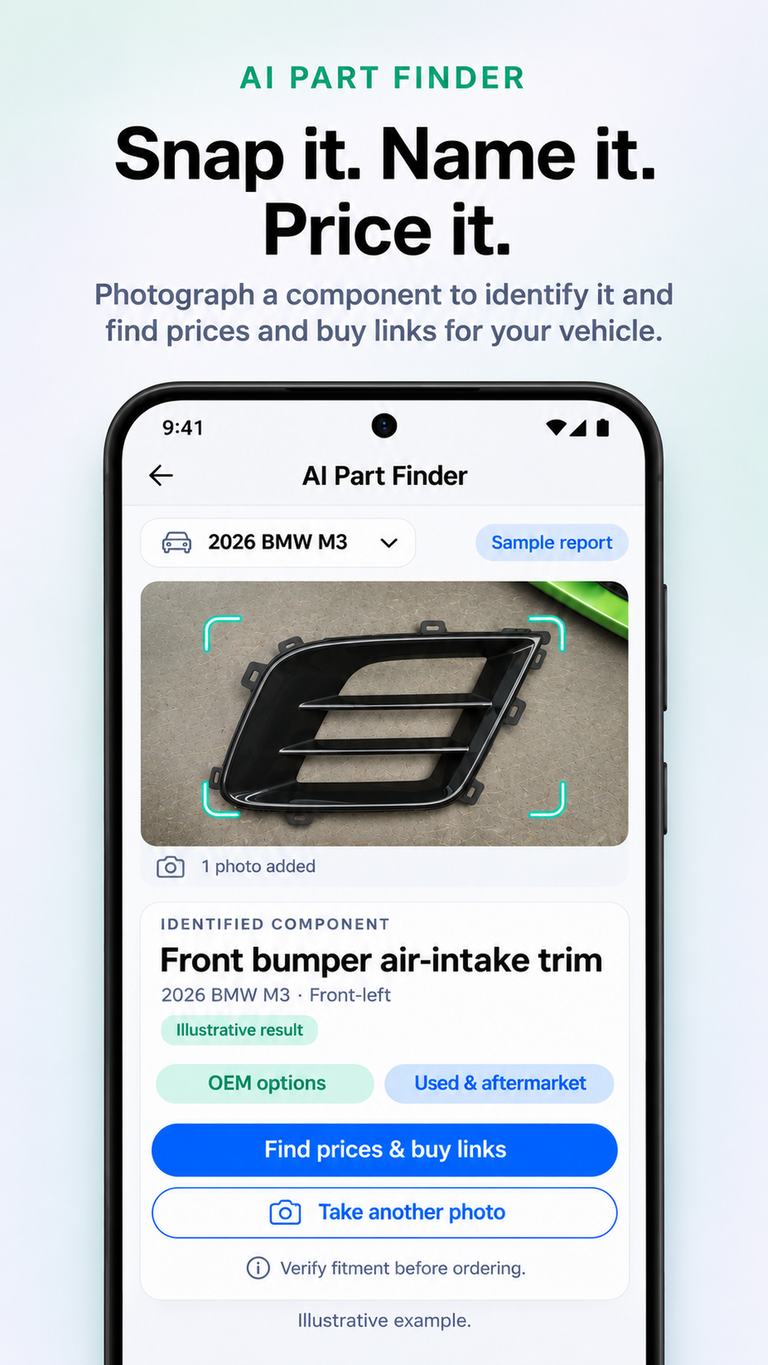
Have a loose bracket, broken lamp or unfamiliar component? Use AI Part Finder to help identify a photographed part and research matching options for the vehicle, without treating a visual match as confirmed fitment.
AI Part Finder is available to eligible signed-in paid accounts; check your current access in the app. It is a separate photo-identification tool from the part listings attached to damaged components in a report.
A useful report explains the vehicle, the findings and the assumptions behind the total. Open the relevant sections when you compare the report with a shop's written scope.
Keep the VIN, uploaded photo strip, analysis date and available vehicle details together, including trim, engine, transmission, drive type, fuel type, body style, colors and mileage where supplied. Review primary, related and inferred findings, severity and suggested Repair, Replace or Inspect actions. Use hidden-damage flags to make an inspection list.
Expand a damaged component to read its reasoning, available repair guidance and related repair-video links. Use that context to discuss repair methods and calibration questions with a technician, who verifies current manufacturer procedures for the exact vehicle.
Return to vehicles in Saved Reports. Share the report's web link with a repairer, buyer or colleague, using your phone's sharing options. Keep the original report and a shop's later written estimate distinct so changes in scope remain clear.
Review each operation, labor-type codes and estimated hours, along with separate parts, body labor, paint/refinish labor, paint materials and the overall total. Changing the hourly labor rate recalculates the report’s cost assumptions. Entering a shop's stated rate can make the comparison more useful; it does not confirm the estimated hours or required operations. Ask about scans, calibration, materials and inspection-dependent supplements.
Use the local-shop handoff and scope-comparison checklistWork backward from your expected resale value and target profit. Enter repair, transport and miscellaneous costs, then use estimated auction fees or your own fee amount. Adjust one assumption at a time to see how much room remains for the bid.
This manual tool is separate from the three bid strategies in an auction report. Review the current scenario assumptions and use verified auction charges in your buying budget. Neither tool guarantees a profitable purchase.
Use the Tools tab to ask text questions about a budget, salvage title, damage risks, seller questions or listing details you paste into chat. For example: “Which costs are missing from this purchase budget, and what should I ask the seller?”
Attach a saved report to discuss its findings, and explore 12 suggested questions for your account type. Conversations do not use repair-report credits. Optional max-bid and all-in cost calculations need the required inputs. Guidance is preliminary and does not replace a qualified inspection.
Auction reports can show as-is value, clean-title and salvage-title after-repair estimates, part-out ranges and available market examples or source information. Review market demand, repair complexity, parts availability and resale outlook when returned. Select a target return to compare Maximum Flip, Rebuild and Salvage Bid scenarios.
These are planning estimates, not appraisals or promised sale prices. Market context may use fallback estimates when evidence is limited.
Enter origin and destination cities or ZIP codes, or supply the distance in miles. Review the vehicle-size adjustment and estimated cost breakdown, then add the estimate to the report. Keep an actual carrier quote separate from this planning figure.
The transport calculator estimates costs; it does not book a carrier or provide a binding delivery quote.
Repair and Insurance reports can display supplied shop and customer details; Insurance reports can also include the insurer and claim reference. Use these details to organize an intake conversation, not to imply approval. Website estimate widgets and business lead tools are managed through the web platform, separate from the native app’s report and parts screens. Your selected account persona is not a subscription tier.
Plan repair costs before you bid, buy, or authorize work. Verify the preliminary report with a technician.
One vehicle at a time
For a single vehicle or occasional repair question. Review the purchase details and report scope before paying.
For recurring report needs
Review the included reports, eligible parts tools, account access and renewal terms in your platform’s purchase screen.
App downloads are free. Reports and subscriptions are paid separately. Confirm current prices, included features and renewal terms in Google Play or Apple’s purchase screen.
Avery is the Vehicle Assistant, Milo the Repair Assistant, Panel the Body Shop Assistant, Scout the Auction Assistant, Torque the Rebuild Assistant and Atlas the Claims Assistant. Your account type selects the active profile; you can change that type in Profile. These are audience-focused AI profiles, not six concurrent experts. Attach an owned saved report and use twelve ready questions without spending report credits. Verify any suggested action with the relevant professional.
The official listings are named Car Repair Estimate & Parts. Current features include exact-VIN public auction records when found, model-year recall campaigns with an official VIN-check link, and personalized assistants that can discuss an attached saved report. Public history can be incomplete; model campaigns do not establish an individual VIN's unrepaired recall status.
Yes. Attach a saved report to your personalized assistant and explore 12 suggested questions for your account type. Conversations do not use report credits. Optional bid and all-in cost calculations need the required inputs. Guidance is preliminary, not a repair inspection or safety assessment.
Car Repair Estimate & Parts is an Android and iPhone app by AutoEstimatePro LLC. Start with a 17-character VIN and selected vehicle damage photos. VIN decoding helps identify the vehicle; the paid report organizes preliminary parts, labor and paint estimates for your selected report purpose.
It is designed for drivers comparing collision repair options, salvage-auction buyers estimating rebuild costs before bidding, DIY repairers sourcing parts, and shops or adjusters preparing a structured first draft.
The app is free to download. Repair reports and subscriptions are separate paid in-app purchases. Review the current price, included reports, renewal terms and features in your platform’s checkout before purchasing.
The app supports preliminary repair-cost planning for salvage and auction vehicles, including parts sourcing, auction-fee modeling, and maximum-bid calculations. AutoEstimatePro is independent and is not affiliated with or endorsed by Copart, IAA/IAAI, Manheim, or Cox Automotive.
No. AI-generated reports are preliminary, not a shop quote, repair authorization, safety determination, or insurance decision. Photos can miss hidden damage. Have a qualified technician inspect the vehicle before buying, bidding, or authorizing repairs; the repair facility sets the final scope and price.
Choose Rebuild, Flip / Resell, Part-Out, Repair or Insurance. Auction-focused reports include vehicle-value and Investment Analysis sections; Repair and Insurance hide those sections. Report-level replacement-part purchase links appear for Rebuild, Repair and Insurance when sources are available, and are omitted for Flip and Part-Out.
In the Parts tab, add one to three part photos, optional vehicle context and an optional ZIP code. Review a suggested part identity, possible OEM number, compatibility and condition notes, buying tips and replacement sources. AI Part Finder is available to eligible signed-in paid accounts; check access in the app. Confirm the physical part number and fitment before purchasing.
Saved account reports appear in the Reports tab. A finished report can create a shareable web link and open your phone's sharing options. Send that link with your inspection questions, then ask the shop for its own written estimate and final repair scope.
Auction reports compare flip, rebuild and salvage strategies with selectable return assumptions with the current calculation assumptions. The separate Max Bid tool accepts resale value, repair, transport, miscellaneous costs and target profit, with estimated fees or a manual fee amount. Check actual auction charges before bidding.
Download Car Repair Estimate & Parts from Google Play for Android (package com.autoestimatepro.mobile) or the Apple App Store for iPhone (app ID 6800401402). Check the relevant store listing for device compatibility, regional availability and current in-app purchases.
Verify current compatibility, pricing, and app privacy disclosures on the official Apple App Store listing or the Google Play listing. Read the app developer's privacy policy before uploading vehicle photos.
1. Enter a VIN • 2. Upload photos • 3. Get your estimate
Disclaimer: Repair estimates are AI-generated & preliminary. Verify with a licensed technician before bidding, buying, or authorizing repairs; final repair costs are set by your repair shop. Parts prices reflect third-party retailer availability at the time of your report.
As an Amazon Associate and eBay Partner Network member, AutoEstimatePro earns from qualifying purchases made through affiliate links in your report.
Copart®, IAA®/IAAI®, and Manheim® are registered trademarks of their respective owners. AutoEstimatePro is an independent tool, not affiliated with, endorsed by, sponsored by, or licensed by Copart, Insurance Auto Auctions, Manheim, or Cox Automotive.