
1. Make a small photo record that explains the damage
Only photograph a vehicle when you can do so safely. Do not stand in traffic, open damaged high-voltage components, dismantle trim or crawl under an unsupported car. If you are unsure whether the vehicle is safe to move, ask a qualified professional about inspection or transport; neither a photo set nor an app report establishes roadworthiness.
In Photos, keep the images for this incident together in an album so you can review them before selecting uploads. An album is an organizing step on your phone, not a connection to AutoEstimatePro. Check each image at full size rather than choosing from thumbnails alone.
- Orientation: one wide view showing which side or corner is affected.
- Extent: a medium view showing the damaged panel and its neighboring panels.
- Detail: close views of visible cracks, dents, gaps or broken mounts, without removing parts.
- Context: an undamaged angle if it helps explain alignment, plus a separate note identifying older damage.
For a scraped rear bumper, a close-up may show paint damage but hide the gap beside a tail lamp. Add a wider rear-corner view and describe when you first noticed the gap. That is a question to inspect, not proof that a bracket or lamp needs replacement. Avoid portrait blur, heavy filters and screenshots of small thumbnails when a clear original photo is available.
Write a brief incident note: the affected area, what happened if known, what changed afterward, and what remains unknown. Keep warning lights or unusual handling in that note without trying to infer their cause from body damage.
2. Check location information and unnecessary personal details
Vehicle photos can include a home address, faces, documents and location metadata. Keep unrelated paperwork and people out of the frame. Submit vehicle identifiers only where needed; do not post your report link publicly just to ask one shop a question.
Apple explains how location metadata works in Photos. You can inspect a photo by swiping up or opening its information view. When sharing from Photos, Apple documents Share → Options → turn off Location. Apple also documents removing an existing location and changing Camera location access in Settings.
These controls have different purposes: changing Camera access affects future collection, while removing an existing location addresses a photo already taken. Turning off Location for one Photos share does not guarantee that an app's separate upload picker removes metadata. Menu labels can vary with iOS version; use Apple's current instructions and review the app developer's privacy policy. Do not assume previously uploaded copies are changed when you edit an original.
3. Confirm the official app, vehicle and report purpose
The official Car Repair Estimate & Parts iPhone app on the App Store is provided by AutoEstimatePro LLC. Check the listing for current device compatibility, purchases and privacy information. Downloading is free; reports and subscriptions are separate paid purchases. The website widget's offer is not a promise of identical native-app pricing or entitlements.
Compare your entered VIN, model and vehicle details with the actual vehicle before ordering. VIN decoding is an identification step, not an accident-history check. Review the selected photos before completing a purchase.
For an existing vehicle needing body repair, review the Repair purpose. Insurance can help organize an early damage discussion but cannot decide coverage or settle a claim. Rebuild, Flip / Resell and Part-Out address auction or resale planning; their investment analysis is not a repair authorization. The Android and iPhone app overview explains all five purposes, saved-report sharing and the separate tools.
4. Turn findings into questions, not automatic purchases
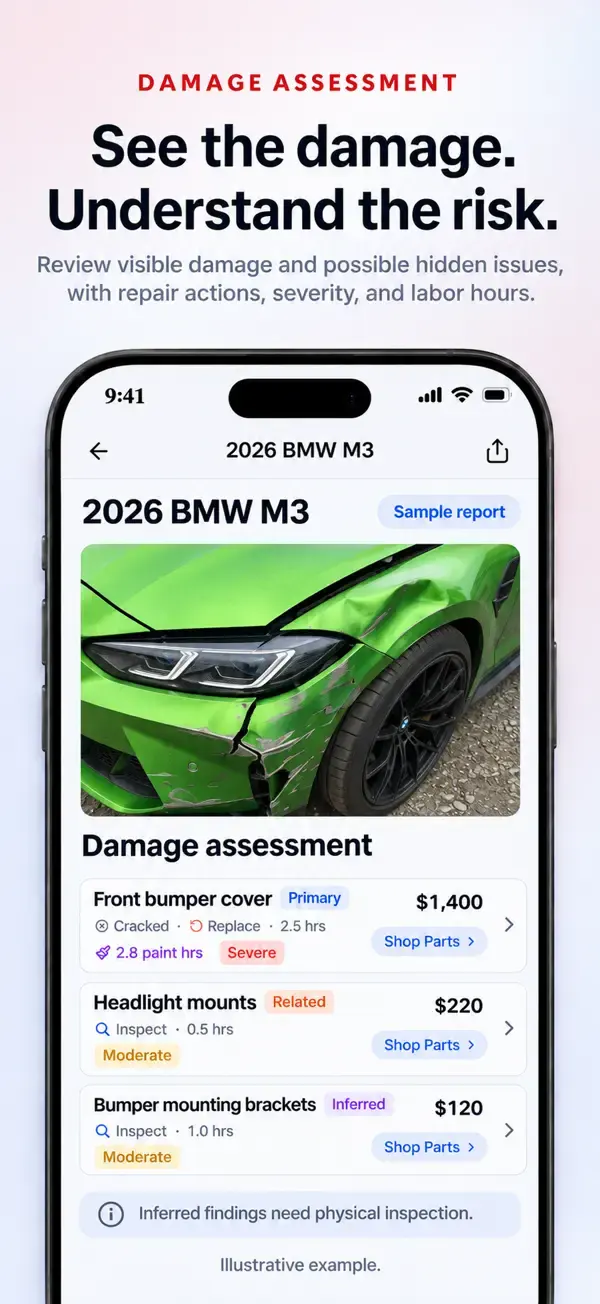
Separate a visible observation from a proposed operation. “Scraped bumper cover” describes evidence. “Replace the cover” is a repair decision that may depend on material, repairability, attachments and inspection. An item marked for inspection or left unpriced is not a promise of zero cost.
If a headlamp is involved, ask about the correct side, connector, lighting package and physical part number before buying. The separate AI Part Finder accepts one to three part photos with optional vehicle context and ZIP code, and requires eligible signed-in paid access. Its suggested identity and supplier links are research leads, not verified fitment or guaranteed stock.
Keep this short question list beside your report:
- Which findings can you confirm, and which require inspection or disassembly?
- Is each panel being repaired or replaced, and why?
- Are removal, paint materials, scans or any required calibration included or still unpriced?
- Are inspection or teardown charges payable if I decline the repair?
- What written approval will you request before additional work?
The FTC's Auto Repair Basics recommends getting a written estimate identifying the condition, parts and anticipated labor, plus an arrangement for approval of additional work. Ask the shop for warranty terms too. Local legal requirements vary; this guide does not determine your rights or an insurer's obligations.
Save the preliminary report, the shop's written estimate and any supplement as distinct records. Share a finished report link only with intended recipients, and review what it exposes before sending it. An independent AutoEstimatePro report is not a listed shop's quote or endorsement. If you submit a shop-contact request through our service, our team reaches out on your behalf; a response or appointment is not guaranteed.
For the next step, use the worked repair-scope comparison and shop handoff worksheet. Its comparison method also works for an iPhone report. For a cost starting point, see the dent repair cost guide, then verify the actual scope with a repairer.
5. Do a photo review before you pay for a report
Open each intended image in Photos and confirm that the damage is visible at full size. If you cannot see a crack or dent yourself, do not expect a report to establish it from a blurred image. Retake an unclear view when it is safe, rather than adding annotations that cover the area being evaluated.
- Glare: change your position so reflections do not conceal a dent or paint damage. Keep a wider reference view too.
- Low light: use a safely lit location; check that shadows are not being mistaken for gaps or missing pieces.
- Very tight crops: add an uncropped context view showing where the component belongs on the vehicle.
- Multiple incidents: label older damage in your own note and avoid mixing another vehicle's photos into the selection.
- Private details: check reflections, documents and background addresses as well as the obvious subject.
If the picker cannot access an image, first check that it opens fully in Photos and review the app's current photo-access permission. Follow the app's displayed file requirements; this guide does not promise support for every image format, file size or iOS version. Do not repeatedly purchase reports to diagnose an upload problem. Keep the error message, app version and iOS version for support, without including payment details in screenshots.
Keep the originals for your own record. If you make a privacy-conscious copy, inspect that copy before upload and do not alter the apparent damage. A screenshot of a report or photo is not a reliable substitute for the original image or a verified method of stripping all personal information.
6. Two examples: useful questions from different kinds of damage
A door dent with apparently intact paint
Take an overview showing the door and adjacent panels, followed by angles that make the dent visible without exaggerated filters. Record whether you noticed any change in door operation, but do not force a damaged door open or closed for the photo set. An image may not show paint cracking, access behind the panel or the extent of a crease.
Ask the repairer whether paintless dent repair is appropriate, what access is needed, and what would change the recommendation to conventional repair and refinishing. A small-looking dent is not automatically a paintless repair. Compare the shop's findings with the dent repair cost factors, not with a promised app price.
A cracked headlamp beside a shifted bumper edge
Photograph the visible lamp damage, the surrounding corner and the gap between the lamp and bumper. Include any safely readable part markings as a separate detail view. The visible crack does not establish whether the mounting area, wiring or neighboring component is undamaged.
Before sourcing a replacement, ask the shop to confirm the lighting configuration, side, part number and included modules or attachments. If the report suggests a related inspection, preserve that uncertainty. A matching-looking listing cannot establish compatibility or whether any additional setup is required. AI Part Finder may help organize candidates, but the repairer must verify the physical match and repair procedure.
Both examples are decision checklists, not diagnoses or actual customer cases. They show why a useful report keeps observations, possible causes and recommended checks separate. Neither example supplies a local labor rate or a final cost.
7. Share a clear record, then keep track of what changed
Before sending a saved report link, review its contents as the recipient would see them when possible. Confirm the vehicle and incident, remove unrelated information from your message, and send it directly to the intended estimator. A shareable link should not be treated as a private attachment merely because you have not posted it publicly; ask support about access controls if you need a particular restriction.
Keep a simple note with the date, report reference, recipient, questions asked and response. If the shop sends its own estimate, save it separately with its date and version. If you edit a report or generate another version, tell the recipient which version you mean rather than assuming an earlier message has changed.
“This is my preliminary photo report for the damage described below. Please confirm which findings you can verify and what needs inspection. I would like your written scope, any inspection charges and the process for approving additional work. I have not authorized repairs by sharing this link.”
For a service-submitted shop-contact request, our team reaches out for you; keep the request reference so you can follow up without submitting duplicate requests. Sending a report does not mean the business has accepted the job, endorsed the analysis or scheduled an appointment. A written response from the repairer is the place to confirm those next steps.
iPhone photo-estimate questions
Can my iPhone photos tell me the final repair cost?
No. Photos can support a preliminary visible-damage estimate, but cannot confirm damage behind panels, required measurements or every repair operation. A repair facility must inspect the vehicle and set its own scope and price.
Does turning off Location in the iPhone share sheet cover every upload?
No. Apple's Location option applies to that Photos sharing action. It does not establish how an app's separate photo picker or an existing report handles metadata. Review the selected file and the service's privacy policy before uploading.
Is downloading the iPhone app the same as buying a report?
No. AutoEstimatePro is free to download, while reports and subscriptions are separate paid in-app purchases. Check the current App Store listing and in-app purchase terms, including renewal terms, before buying.
Should I crop every damage photo before uploading?
No. A tight crop can remove useful panel and alignment context. Keep a clear overview as well as detail views, preserve your original images, and avoid edits that change how the damage appears. Review unrelated personal information before sharing.
What if I cannot select or upload an iPhone photo?
Check that the intended image opens fully in Photos, review the app's photo-access permission and its stated upload requirements, and try a small selection again. Keep the original files. If the problem continues, contact support with the error and app/iOS versions rather than paying for another report to troubleshoot.
Does a photo report distinguish cosmetic damage from hidden damage?
It can describe visible findings and flag possible related damage, but cannot establish what is behind a panel. Ask a qualified repairer which findings are confirmed and what inspection or disassembly is needed before deciding on the repair.
Sources and scope
Apple's documentation supports the iPhone privacy instructions; the FTC supports the written-estimate checklist. Neither organization endorses AutoEstimatePro or validates an AI repair result. App descriptions here explain our own product, not independent testing or measured accuracy. No customer savings, repair outcomes or diagnostic accuracy rates are claimed.