
The useful handoff has four pieces
- The correct vehicle and a short description of what happened.
- Clear photos showing both the damage and its surroundings.
- The preliminary report, with unconfirmed items marked for inspection.
- A request for a written shop estimate with inclusions, exclusions and approval steps.
Start with the right Android app and vehicle
AutoEstimatePro is available on Google Play as Car Repair Estimate & Parts. Use the official listing, with package ID com.autoestimatepro.mobile, and check compatibility for your phone. The app is free to download; repair reports and subscriptions are separate paid purchases. Confirm the current offer in the app before buying.


Before requesting a report, compare the VIN on the vehicle with the VIN you entered. Check the year, model and equipment description too. A wrong trim or option can change the part being discussed. NHTSA explains what information a VIN decoder identifies; decoding identifies encoded vehicle details and does not establish a complete accident or repair history.
Choose the report purpose before you order
AutoEstimatePro offers Rebuild, Flip / Resell, Part-Out, Repair and Insurance reports. For a vehicle you own and want repaired, start by reviewing Repair. Insurance can organize an early damage discussion and display supplied insurer or claim references; it does not determine coverage or approve a claim. Repair and Insurance reports can include supplied shop and customer details.
Rebuild, Flip and Part-Out are for auction decisions. Their vehicle-value and Investment Analysis sections can include as-is and after-repair estimates, part-out ranges, market context and three bid strategies. Repair and Insurance hide those investment sections so the repair conversation stays focused. Rebuild, Repair and Insurance reports show replacement-part purchase links where available; Flip and Part-Out omit those links.
Take photos that let someone follow the damage
Start with a wide view of the affected corner or side, move closer to show the damaged component, then add detail views of cracks, gaps or mounting areas that are visible without dismantling the vehicle. Include an undamaged reference angle when it helps explain panel alignment. Avoid relying on one tightly cropped picture: an estimator needs to understand where the damage sits.
- Use steady, well-lit photos; check them for blur and glare before uploading.
- Include an overview and close-up of each affected area, rather than many copies of the same angle.
- Describe warning lights, unusual sounds or changes you noticed separately. A photo cannot establish their cause.
- Record older damage separately so it is not mistaken for part of the current incident.
- Photograph only what you can access safely. Ask a professional about transport if the vehicle may be unsafe to drive.
Do not take trim apart or reach under an unsupported vehicle to complete a photo set. An absent photo is a limitation to flag, not evidence that the area is undamaged.
Read the line items before the total
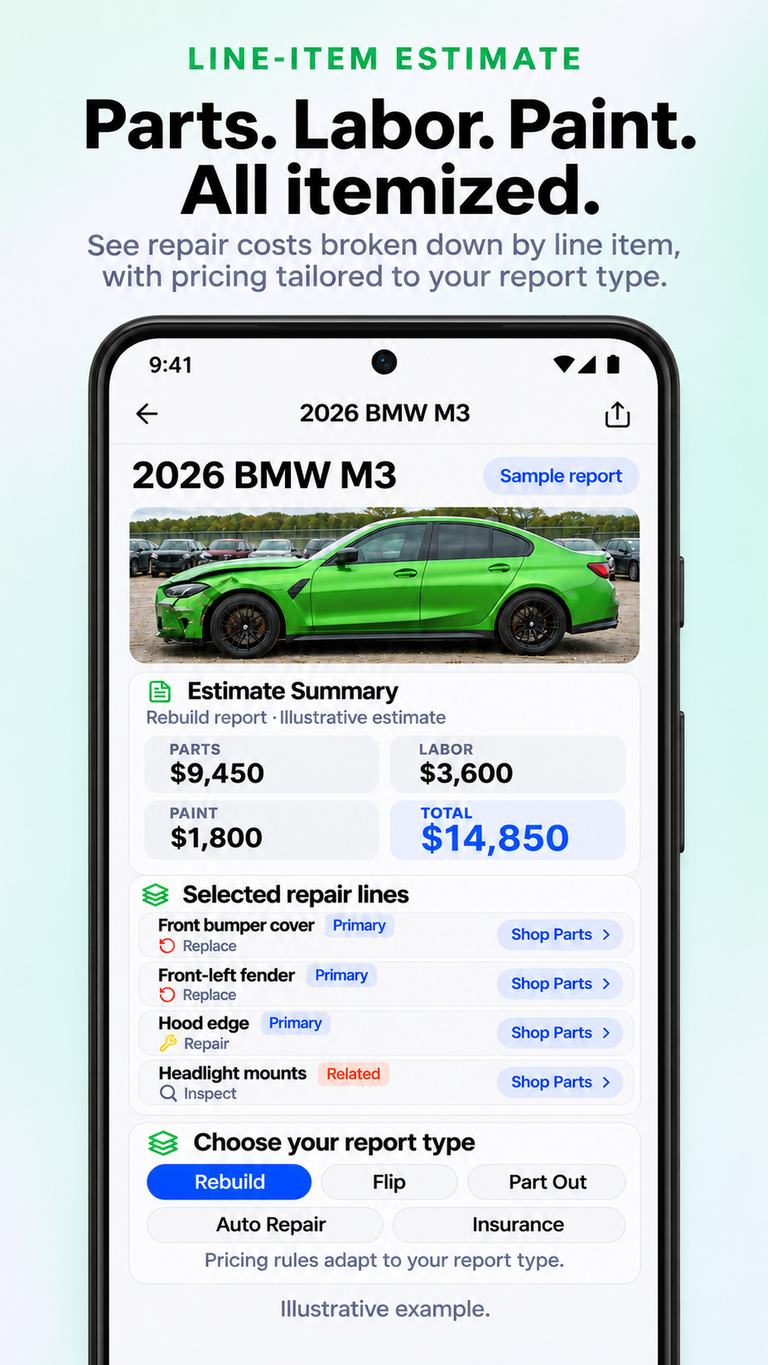
Group the report into parts, body labor, refinish work, materials and inspection-dependent items. Ask which lines are supported by the photos and which are suggested checks.
For every “inspect” item, write down what is still unknown. A zero-dollar or unpriced entry does not mean the possible repair will be free. It means there is not yet a confirmed price for that scope.
A linked replacement part is a research lead. Before purchase, ask the shop to confirm fitment, condition, shipping, return terms and whether it will install a customer-supplied part.
The report is preliminary. The shop may reach a different repair-versus-replace decision after inspection, measurements or disassembly. Ask the estimator to explain that difference and identify the evidence behind it rather than treating either total as the starting point for an argument.
Use AI Part Finder when the part itself is the question
A vehicle report organizes damaged components. The separate AI Part Finder in the Parts tab helps when you have a specific loose, damaged or unfamiliar component to identify. Add one to three photos, include optional vehicle information, and use an optional ZIP code for available local salvage pricing. Photograph the front, rear, mounts and readable markings when safe to do so.
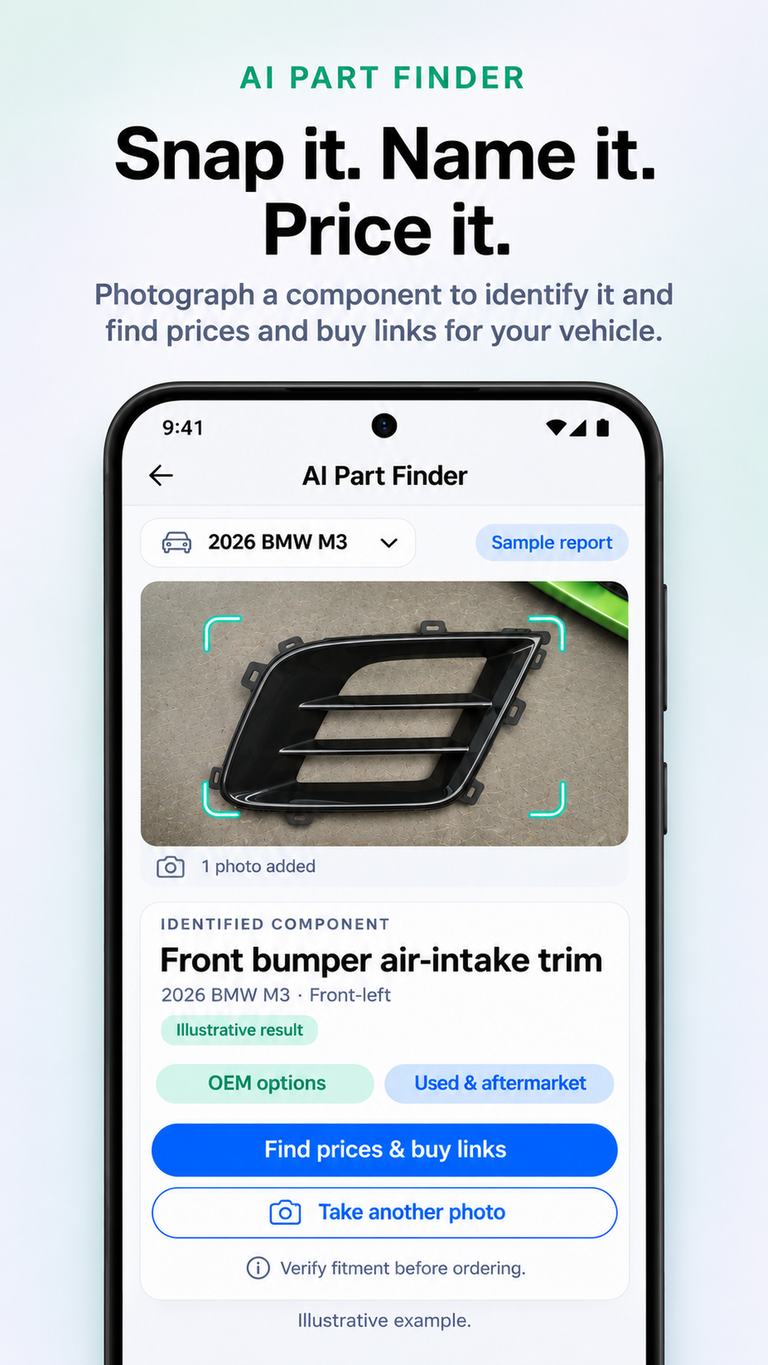
Review the candidate name, category and side, possible OEM number, compatibility notes, visible condition and buying tips. Then compare the suggested replacement sources.
For a broken headlamp, for example, ask the shop to confirm the side, connector, lighting package and part number before you compare a supplier price. A visually similar lamp can still be the wrong part.
AI Part Finder requires eligible signed-in paid access; check your account in the app. Report-level supplier links and the separate Part Finder are different tools.
Ask whether the shop accepts customer-supplied parts, whether it provides a labor warranty on them, and who handles a return if the part does not fit. A low listing price is only useful after fitment, shipping, condition and return costs are clear. The sample screen above illustrates the workflow; it is not a verified match for your vehicle.
Use the report details to explain a scope difference
Keep the VIN, available vehicle details, analysis date and original photo strip with the estimate. Check the severity and damage label for each component. Primary, Related and Inferred findings tell you whether the report is describing visible evidence or a possibility that still needs inspection. Expand the item for the reasoning, available repair guidance and related video links; a technician verifies the actual procedure.
Next, compare parts, body labor, paint/refinish labor, paint materials, operation codes and estimated hours. The app's editable labor rate recalculates cost assumptions. If a report uses 5 hours and a shop states $100 per hour, that line would be $500 in a simple hypothetical comparison. Matching the rate does not validate the five-hour estimate: ask whether removal, transfer, calibration or other operations are included.
A worked example: why two repair totals differ
Consider two hypothetical scopes for the same bumper-area repair. These are made-up planning figures, not local market rates. Both use the same basic parts and labor assumptions. One also includes allowances for items awaiting confirmation.
| Operation | Scope A | Scope B | Question for the shop |
|---|---|---|---|
| Parts | $450 | $450 | Check part number, condition and supplier. |
| Body labor | $400 | $400 | Both assume 5 hours at $80/hour. |
| Refinish labor | $240 | $240 | Both assume 3 hours at $80/hour. |
| Paint materials | $160 | $160 | Confirm the same material allowance. |
| Brackets and inspection-dependent items | Not priced | $225 allowance | Confirm what inspection must establish. |
| Scan/calibration work | Not priced | $320 allowance | Ask which operations the vehicle actually requires. |
| Illustrative subtotal before tax | $1,250 | $1,795 | The $545 difference is added scope, not a rate difference. |
Scope A is $545 lower because two categories are not priced. That does not prove it is cheaper for the same completed work. It also does not establish that Scope B's allowances are necessary. Ask which brackets are damaged, what the inspection covers, and which scan or calibration operations are required for this exact vehicle and repair. Then compare revised scopes with the same assumptions.
Keep estimated allowances separate from confirmed operations. If an operation is excluded, write “excluded” beside it. If its need or price is unknown, write “pending inspection.” Do not convert either label into a zero-cost assumption.
Send a short, usable request to the body shop
Open the saved vehicle in Reports, create its shareable web link and use your phone’s sharing options to send it. Ask whether the estimator would like the original photos too. Avoid sending a long stream of screenshots without context. A message like this keeps the request specific:
“I have a preliminary photo report for my vehicle. Could you inspect the damage and provide your written estimate? Please identify the parts and labor included, any inspection or teardown charges, work still unpriced, and how you handle approval if more damage is found. I have not authorized repairs.”
The FTC's auto repair guidance recommends a written estimate describing the work, parts and anticipated labor, along with an approval arrangement for additional work. Ask about diagnostic charges before booking and get the shop's warranty terms in writing. Confirm any applicable local requirements with the appropriate local authority.
Use the local repair directory to build a shortlist, then contact each business to verify collision-repair capability, experience with your model, appointment availability and its approach to the specific work. A directory listing does not establish that the business is affiliated with AutoEstimatePro or has agreed to honor a report's price.
A handoff worksheet you can reuse
Put these fields in a note beside your saved report. Share it privately with the estimator rather than publishing vehicle identifiers in a review or public comment. Leave unknown answers marked “not confirmed”; guessing makes the comparison less useful.
- Vehicle and incident: year/model, relevant equipment, affected area, incident date if known, and older damage identified separately.
- Evidence: report date or version, private report link, and which photos show each concern.
- Repair decisions: repair versus replace for each panel, proposed part type and fitment checks still needed.
- Cost basis: hours and hourly rates, paint/material allowance, taxes and fees, and any exclusions.
- Open items: what requires inspection, any inspection or teardown charge, who confirms it, and when.
- Approval: the written scope you accept, how additional work is approved, and a copy of each supplement.
For the example above, the note would say: “Scope B adds $225 for brackets and $320 for scan/calibration work. Please confirm whether each is required, whether those amounts are allowances or fixed prices, and whether anything else remains unpriced.” The $545 difference is arithmetic within this invented example, not evidence that either total is the right price for a real vehicle.
What to do when a quote still has unknown costs
A total cannot be compared fairly if one quote includes tax, towing or storage and the other does not. Ask each shop to identify exclusions and the cost of establishing the remaining scope. Do not convert an “inspect” line into a guessed repair price just to make a spreadsheet balance.
If one estimator specifies a repair and another replacement, first ask why their procedures differ. Then compare part condition, associated labor and warranty terms. A cheaper part may introduce shipping, return or labor responsibility that is absent from the listed price. Neither the app nor the lowest total decides which procedure is appropriate.
Before approval, request a written explanation of any deposit, diagnostic or teardown charge and what happens if you stop after inspection. Keep transport and rental arrangements separate from an unconfirmed completion date. This is a question checklist, not a claim that every listed charge applies to your repair.
Keep the estimate, supplement and final invoice distinct
Save the preliminary report, the shop's initial estimate and later changes as separate versions. If disassembly reveals more damage, ask which additional parts or operations are needed, what they cost and what requires your approval. Keep a note of which version you approved and when. An insurance estimate or payment is a separate document; the app cannot approve coverage or authorize a repair.
Before collection, compare the completed repair order with the approved scope and ask the shop to explain any changes. Keep the invoice, warranty information and relevant supporting records together. This makes the phone report a useful starting record in a longer repair process.
Compare hours and rates before comparing the final number
Two quotes can have the same total for different reasons. In a second hypothetical example, Shop A lists five body-labor hours at $80, while Shop B lists four at $100. Each line totals $400. That is not enough information to choose between them: one may include removal and transfer work that the other lists elsewhere. Ask each estimator to identify the operations, not simply match the other shop's hourly rate.
Use a separate comparison row for body labor, refinish labor and materials. If a quote combines categories, request a breakdown before treating the categories as equivalent. Do not add the app's estimated labor time to the shop's labor time; they are alternative estimates of scope, not automatically separate work.
- Match the component: confirm the same panel, side, vehicle option and part number where available.
- Match the operation: distinguish repair, replacement, removal/refitting and refinishing. Ask whether adjacent-panel work is included.
- Match the part type: identify new original-equipment, aftermarket, reconditioned or used parts rather than comparing a generic “bumper” price.
- Separate the assumptions: identify fixed prices, allowances and work pending inspection. Keep tax, transport and rental outside the repair subtotal until their treatment is clear.
A used assembly and a new bare component may include different attachments. Ask what comes with each part, whether the shop accepts the proposed source, and who handles a defective or incorrect item. These questions are particularly useful when the report or AI Part Finder links to a low advertised price. A source link does not confirm availability, installation suitability or the shop's warranty obligations.
If the answers remain unclear, ask another qualified repairer to inspect the vehicle and explain its procedure. Send the same incident information and original photos so the second opinion is based on the same starting evidence. A second estimate is a scope check, not a requirement that every business quote the same price. The bumper repair cost guide gives additional context for the repair-versus-replace discussion.
A supplement example: an unknown item becomes confirmed work
Suppose a report says “inspect mounting area” and the shop later identifies a broken attachment during disassembly. That is a change in available evidence. Ask for the finding and its effect on the repair plan instead of assuming the initial AI estimate promised that the attachment was intact.
A useful supplement identifies the affected component, the added or revised operation, the part specification, labor, any associated charges, and the change to the earlier total. Ask what was already included so the new line is not counted twice. Also ask whether the discovery changes parts availability, the expected completion date, or another planned operation. The answer should be attached to that specific vehicle and inspection, not inferred from a sample report.
“Please send the supplement showing what changed from your previous estimate, what evidence supports it, and the added cost and timing. Please identify any items still pending inspection and the approval you need from me. I am requesting clarification, not authorizing additional repairs in this message.”
Keep a dated record of the version you approved and any separately required insurer communication. A report labeled Insurance does not approve a supplement or establish who must pay. Ask the repairer and insurer about their respective processes; do not assume the app's report replaces either one.
Keep buying tools separate from the shop's quote
If the vehicle is still an auction prospect, use the separate Max Bid calculator for resale value, repairs, transport, miscellaneous costs, target profit and estimated or manually entered auction fees. Review the current auction-report bid assumptions and verify actual account-specific fees before committing. The transport calculator can use cities, ZIP codes or a distance in miles and a vehicle-size adjustment. Its result is a planning estimate, not a carrier booking or binding quote.
A personalized AI assistant can discuss an attached saved report and offer 12 suggested questions for your account type. Conversations do not use repair-report credits. Optional max-bid and all-in cost calculations need the required inputs. Treat the answers as preliminary guidance and bring unresolved technical questions to a qualified professional.
Quick answers before your first visit
Can a body shop charge more than the app estimate?
Yes. The app produces a preliminary planning report. The shop prices its verified scope using its own rates, parts decisions and repair requirements. Compare the reasons for the difference and request a written estimate before authorizing work.
Should I buy every part linked in the report?
Wait until fitment and the repair plan are confirmed. Ask whether the shop accepts customer-supplied parts and how that affects returns, delays and warranty responsibility.
Does Android replace the iPhone app?
No. AutoEstimatePro is available through Google Play for Android and the App Store for iPhone. Check each store for current compatibility and purchases. The app overview shows the photo-report workflow and both official download links.
Using an iPhone? The iPhone photo and privacy guide explains how to prepare your damage record and review location information before sharing images.
How do I compare quotes that use different labor rates?
Separate hours from rates and compare the same operation. Five hours at $80 is $400; four hours at $100 is also $400. Equal totals do not establish equal work. Ask what each time allowance covers and whether removal, refinish, materials and inspection-dependent operations are included.
Does a saved report link authorize a shop to repair my car?
No. Sharing a preliminary report supplies information, not repair approval. Ask for the shop's written estimate and agree how additional work will be authorized before repairs begin.
What should I record when a shop finds more damage?
Ask for the new finding, supporting inspection evidence, added parts and operations, the change in cost and timing, and the approval being requested. Keep the supplement with the earlier estimate rather than overwriting your only copy.
Sources and editorial scope
This guide is written by the operator of AutoEstimatePro, not an independent app reviewer. The comparison is a hypothetical teaching example, not customer research, an accuracy test or a savings claim. FTC guidance supports the written-estimate questions, and NHTSA supports the explanation of VIN decoding; neither endorses this app or verifies a report. The app's photo analysis is AI-generated and requires professional verification.